I Built Hive to Run Claude Code and Codex Workers From One Lead

I was running agent crews before Hive existed, mostly in Solo, Aaron Francis's app for running your dev stack and coding agents in one workspace. I have a lot of respect for what Aaron has built, and Solo was a big inspiration for Hive. Over time I realized I wanted something narrower and more opinionated about one part of it: orchestration. One lead session that plans the work, hands it to worker sessions, and keeps track of everything, set up the same way in every project.
I tried building that myself on top of my existing setup. I put instructions in my global Claude files and each repo's local files, copied a shared runbook (the standing instructions for the lead) into every project, and added hooks to get the lead to follow it. It didn't always run correctly, and setting up a new project that way took a long time. All of that friction pointed me toward a tool with the orchestration baked in, so I built one.
That became Hive. I've been running it every day since the first commit in late July, TJ has been running it for his own projects, and it's now open source and on npm as @cmgmyr/hive. I talked through the backstory on Slightly Caffeinated episode 65 if you want the longer version, and there's a Hive or Solo comparison near the end of this post.
What Hive Is
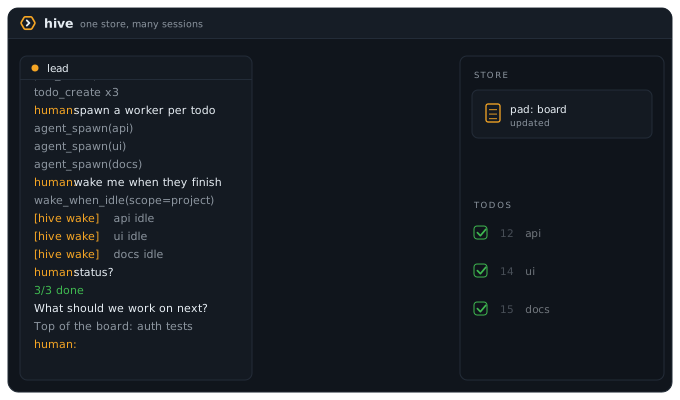
Hive is a CLI plus an MCP server (MCP is the standard way to give Claude Code or Codex new tools). You talk to one session, the lead. The lead plans the work, writes it down, and spins up workers into tmux panes. Each worker is a real Claude Code or Codex session that you can watch and type into while it runs. When a worker finishes, the lead gets woken up with what happened and moves on to the next piece.
Everything they share lives in one local SQLite file. There's no background daemon. Each Claude Code or Codex session runs its own Hive MCP server, and those servers read and write that one local database.
Hive runs on top of Claude Code and Codex, the two harnesses (the agent apps that run the model) it supports. It listens to a handful of hooks on both sides and injects the right instructions into the lead and each worker. The tools you already use stay the tools you use.
The Shared Store
Four things hold all the coordination state, and every session in a project sees changes the moment they happen:
- Pads are named shared documents: the plans, research notes, and the board, a pad that holds today's live state. If a future session should be able to read it without you re-explaining it, it goes in a pad.
- Todos are the work queue. Each one has a body, a priority, tags, and a comment thread. Blockers link them into a dependency graph, so blocked work stays out of the way until the work in front of it is done.
- KV is a small shared scratch space for things like a dev server port or a feature flag.
- Leases let one session claim shared state that more than one session could change, and they expire on their own.
The comment threads end up being the handoff trail. A worker finishes and leaves a comment with the files it changed, the tests it ran, the decisions it made, and what's still risky. The next worker, or the next day's lead, reads that and picks up from there.
How the Sessions Talk
There are two ways for sessions to reach each other, and I use them for different things.
Wakes are Hive's notifications. A wake drops a short message into another session's pane, and that session picks it up on its next turn. A lead can ask to be woken when a worker goes idle, or after a delay, once or on repeat, so nobody sits there polling. Wakes go from a worker to its lead, from one project's lead to another project's lead, and from the queen (one lead that watches every project, more on it below) to any project's lead. If I'm halfway through typing in a pane, Hive holds the wake instead of typing over me.
Here's one I use all the time. Hive's profiles are the instructions that shape how a lead and its workers behave, and I'll sometimes have one lead change a profile. When it's done, the /hive:profile skill asks if it should tell the other running leads that use that profile. I say yes, and each one gets a wake telling it to re-read its profile. Every one of those projects picks up the change within a turn, and I never have to restart or re-explain anything.
Messages between leads. For anything longer than a notification, with real back and forth, I use Claude Code's cross-session messaging, which lets one Claude Code session message another on the same machine. It's a Claude Code feature, so it only works between Claude sessions. I use it to report a possible Hive bug from another project straight to the Hive lead, or to fact-check a blog post from my Obsidian vault. This post went through that loop: the Hive lead sent back versions, PR numbers, and which harness built what.
I keep one rule. Inside a project, the lead and its workers talk only through Hive, because pads, todos, comments, and wakes save the state. Between leads in different projects, nothing needs to be saved for later, so Claude's messaging works fine there.
What a Day Looks Like
Hive gives you the tools: the store, the workers, and the wakes. Your profile decides the habits. Here's what a day looks like with my profile, which is a lot more involved than the shipped ones.
I open a lead for a project. My profile has it read the board and the open todos first, so it already knows what's in flight from yesterday. I tell it what I want to get done.
The lead interviews me if the ask is fuzzy, writes the plan to a pad, and splits it into todos with blockers. Then it spins up workers for the lanes, the independent streams of work, that can run in parallel. I can see every one of them in its own tmux pane. Most of the time I leave them alone. Sometimes I jump into a pane to answer a question or nudge a worker that's heading the wrong way.
When a worker finishes, it leaves a handoff comment on its todo. The lead gets woken up, reviews and tests the work, and only then does the todo get marked done. The lead closes the worker and dispatches whatever got unblocked. The board stays current the whole time, so if I walk away for an hour I can read one pad and know where everything stands.
The 1.7.0 release is a good example of a real batch of work. It was 10 PRs. Codex workers built 5 of them and Claude built the other 5, all under one Claude lead that my profile has review every lane. The biggest change started as a plan that a Codex worker wrote to a pad. A Claude worker picked up that pad and built it, and a second Claude worker fixed what the review found.
That split came from my own setup, which mostly spreads work across two usage pools. Hive doesn't pick models for you. It runs whatever your profile tells the lead to run.
The Planner Finds, the Lead Cuts
My favorite pattern so far is a read-only planning worker, which can read the code and write a plan to a pad but can't change any files. When I added global hive.yml defaults in 1.3.0 (PR #22), a Codex planning worker found three things the lead's plan had missed, including consumers that used to require a local file. It also over-built: a lock file with manual recovery, and a test that would have been brittle. The lead kept the findings, cut the extras, and wrote down why. That PR shipped as one branch, with no lock and no extra test.
Profiles
The part I'm most excited about is profiles. A profile is the set of instructions that shape how the lead and its workers behave: the lead's main prompt, the runbook it follows, and the brief each worker gets. Hive ships three:
- simple is a single session that uses Hive as memory, with no crew.
- orchestration is a lead that plans lanes, writes plans to pads and work to todos, and runs workers with self-contained briefs. Its runbook is a starting point: it covers how a lead supervises and accepts work, but you should fork it and run the
/hive:profileskill to make it your own. - queen is the one lead that watches every project.
Defaults live in ~/.hive/hive.yml, and any project's own hive.yml overrides them key by key, the same way a project's config overrides a framework's defaults. You can keep as many profiles on your machine as you want.
Building a profile by hand is tedious, so Hive ships a /hive:profile skill that interviews you about how you work with agents and then creates or edits a profile for you.
My own profile adds review loops, model picks, and usage tracking. That's its own post.
The Queen
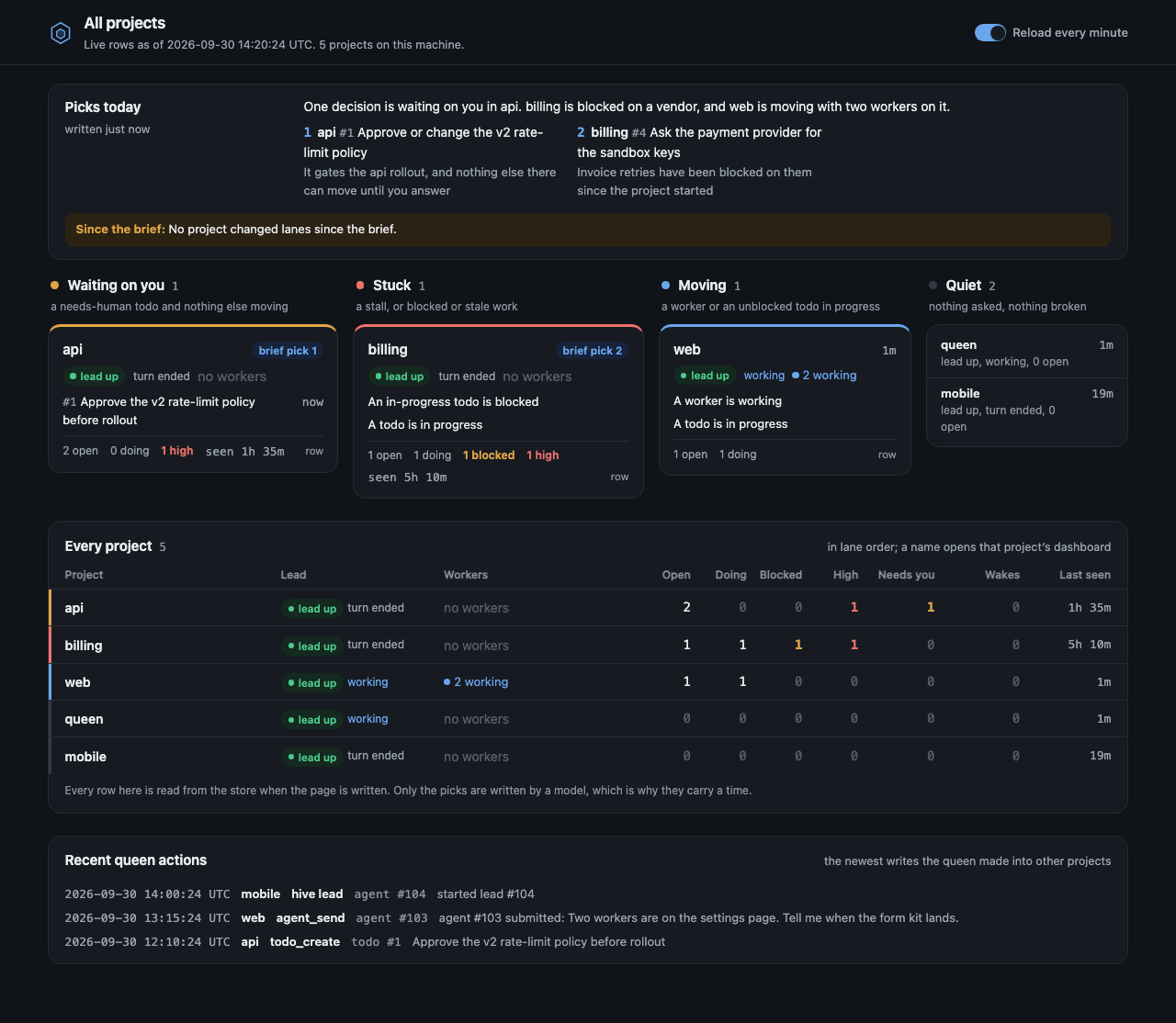
Once I had leads running in a bunch of projects at once, I kept losing track of which one needed me. 1.4.0 added the queen: one lead that reads every registered project and tells you who's waiting on you, who's stuck, and who's moving. It can hand work to another project's lead, and it can't write anywhere else.
hive portfolio prints the same view in the terminal, and hive next drops you into the lead that needs you most.
Claude Code and Codex, and Nothing Else
Hive supports two harnesses on purpose. Claude Code and Codex both have hooks I can use to say "this worker is done" or "send this back to the lead," so Hive can work with each one directly. Other harnesses all handle this a little differently, and supporting them would turn Hive into a much bigger project that I can't test and don't use. I'd rather keep it small.
Codex is optional. A project opts in with one line in its hive.yml:
agents: [claude, codex]
Having both turned out to matter more than I expected. New models keep landing on both sides, and I've switched my lead's model more than once in the last month. Since the plans, todos, and handoff comments live in Hive's store, the next session just reads them and keeps going. The chat history stays with the harness it happened in, and the plans and todos are what carry over.
Why Not Subagents, Agent Teams, or Managed Agents?
This is the first question I get. Claude Code and Codex both keep adding their own ways to run more than one agent, and they're good. Hive workers can still use any of them. Here's where Hive fits next to each one.
Subagents. Claude Code's subagents, and Codex's since March, are great for fanning out inside one conversation. They're mostly invisible while they run and report back at the end, they live inside one session, and the results go away with the conversation. Hive workers are live terminals you can read mid-task, they keep running if the lead's terminal closes or the lead restarts, and what they leave behind stays in the store.
Agent teams. Claude Code's agent teams are the closest thing to Hive. Teammates are separate Claude Code sessions with a shared task list and direct messages, and they can show up as tmux panes. They're still experimental and off by default, they're Claude only, and resuming a session doesn't bring in-process teammates back. Hive is built around work that lasts for days, with Codex workers alongside Claude.
Managed agents. Claude Managed Agents run in Anthropic's cloud, with memory stores, files, and session history that persist. They're billed through the API, and they run Claude only. They're a good fit for agents you deploy as part of a product. Hive runs on your machine, on the Claude Code and Codex plans you already pay for.
Memory. Claude Code and Codex both have memory now, and I use it. Memory carries hints forward: preferences, conventions, things the model decides to recall. Autonomous work also needs a plan every session reads the same way, a queue of todos with blockers and owners, a handoff trail of changed files and tests run, and revisions so two sessions can't overwrite each other. Each harness keeps its own memory, too, so it stays behind when you switch between Claude and Codex. Hive's store holds that shared work state.
Hive or Solo?
If you're looking at Hive, take a look at Solo too. Solo is a full desktop app: a native terminal workspace for your whole dev stack, saved commands and workspaces, and agents across Claude Code, Codex, OpenCode, Pi, Gemini CLI, and more, plus your own. It runs on macOS, Windows, and Linux, and it's free for up to four projects.
Hive is much narrower. It's a CLI and MCP server that runs in tmux, works only with Claude Code and Codex, and puts all its opinions into one thing: a lead that plans and runs a crew of workers. If you want a polished workspace that covers your whole stack and more agents, Solo is probably the better fit. If you live in tmux and want an opinionated lead and worker setup, give Hive a try.
Why Open Source
For a while I wasn't sure I wanted to open source it. Once something is public you get bug reports and edge cases, and I didn't know if I wanted that pressure.
What tipped it was wanting to demo Hive at work. I didn't want a private repo with one-off invites, and I wanted security to be able to read the code if they asked. It had been working great for both TJ and me for months, so I figured I'd put it out there and see what happens.
What's Shipped So Far
Hive 1.0.0 went out on 2026-09-22, and 1.7.0 shipped on 2026-10-04. Along the way it picked up hive upgrade, global defaults and the profile skill, read-only workers, the queen, and a lot of hardening around tmux panes and Codex workers. The changelog has the details.
The newest addition is a security doc that lists what Hive sends, runs, and writes on your machine, with links to the code. If you want to know what you're installing, start there: What hive can do on your machine.
Getting Started
Hive runs on macOS. You'll need Node ^22.14.0 || >=23.6.0, Claude Code, and tmux. Codex is optional.
npm install -g @cmgmyr/hive
hive setup
brew install tmux
claude mcp add --scope user hive -- "$(command -v node)" "$(npm root -g)/@cmgmyr/hive/dist/index.js"
hive doctor
hive doctor checks Node, tmux, Claude, the database, and hooks, and tells you what to fix. From there, run hive in your project to start a lead. If you want Codex workers, add the agents: line from earlier to your project's hive.yml.
A few things that trip people up on the first run:
- Start the lead with
hive, not plainclaude. Otherwise the lead can't be woken up when workers finish. - Hive ships no default first message for the lead, so set
first_messagein yourhive.ymlor the lead will sit and wait for you. - If you use a Node version manager, keep
~/.local/binbelow its block in your PATH.hive setuppins Hive to one Node install, and a version manager picking an older Node per directory can kill the process with no output. - Restart every Hive session after you install or upgrade. A running session keeps the old code.
The code and docs are at github.com/cmgmyr/hive.
It's still early, and there's plenty left to do. If you try it, I'd love to hear what works, what breaks, and what's confusing. Next up is how I track model and effort usage across leads and workers and use those numbers to tune my profile.
Liked this? Get Dev Notes.
A weekly newsletter for developers. AI tools, Laravel, dev workflows, and things I find interesting. Every Monday at 8:45 AM Eastern.